Friday, July 29, 2022

Scratch

SCRATCH

HELLO, SCRATCH

Have you ever heard of Scratch? Scratch is a visual programming language that allows students to create their own interactive stories, games, and animations. As students design Scratch projects, they learn to think creatively, reason systematically, and work collaboratively. Scratch was created by the MIT Media lab, and now Scratch has become more than a programming language; Scratch is a community!

Anyone can share their coding projects, remix and redistribute others' work. And students can post comments on coding projects they like, and follow other users or studios (small communities in Scratch), similar to what other social media platforms offer. With these affordances, Scratch is now one of the most popular online coding platforms in the world. As of June 2022, there are 93,481,000 users registered, and 109,114,000 coding projects uploaded. Every month, around 25,000,000 users visit Scratch. It's fabulous, isn't it?

Maybe it's time to look around Scratch how it looks like. Please click this link: https://scratch.mit.edu/ (Links to an external site.) 


CONTENTS

This page aims to provide basic resources and guidance for pre-service teachers who are interested in using Scratch for their future teaching. Thus, this page includes necessary resources following the categories: 

  1. Basic of Scratch coding
  2. Class and students management in Scratch
  3. Assessment of Scratch projects
  4. Other resources

BASIC OF SCRATCH CODING

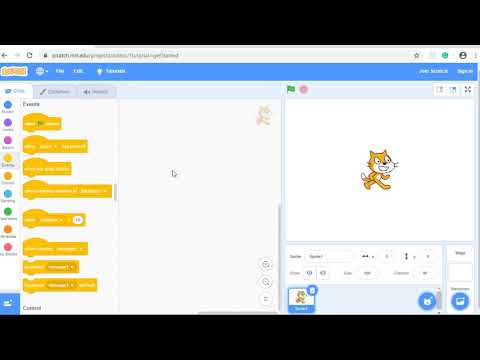
Basically, Scratch is an online coding platform where students can create games, animations, or stories. To encourage young students to participate in coding activities, Scratch allows students to build coding projects using coding blocks. This video might be helpful for you to figure out how Scratch works.


Each coding project provides meta-data such as the likes count, retweet count, and view count. This meta-data might be helpful for you to curate coding projects for your students. Click this link (Links to an external site.) and find four icons below the coding project window. These four icons indicate the count of likes, stars, remixed, and viewed, respectively.

In Scratch, the term remix is similar to the retweet on Twitter. However, the biggest difference is that users in Scratch not only can make a copy of someone else's coding project but also they can modify it by adding new ideas (e.g., changing images) and then redistribute it to the public. 


CLASS AND STUDENTS MANAGEMENT IN SCRATCH

As a classroom teacher, it might be important and, in some sense, necessary to manage students' accounts and check their learning progress. Similar to an LMS tool, Canvas, Scratch also allows teachers to create their own studios. Teachers can set their studios as either private or public, and use these studios as online spaces where students can upload their coding projects.

In order to create your own studios and manage students' accounts, you should create a teacher account on Scratch. This video might be helpful in figuring out how to create classes, and how to add students. 


ASSESSMENT OF SCRATCH PROJECTS

Assessment of Scratch coding projects might be hard. How could we assess students' computational thinking skills manifested in coding projects? One solution might be using this tool: Dr. Scratch.

Dr. Scratch is an online automatic analytics tool that can evaluate Scratch coding projects. Once you input a coding project URL, Dr. Scratch will show you the results in seconds. Click this link to give it a try: http://www.drscratch.org/ (Links to an external site.) 

Screen-Shot-2022-07-29-at-3-28-01-PM


OTHER RESOURCES

If you think Scratch is too difficult to have your students try, you might want to use these coding tools.

Screen-Shot-2022-07-29-at-3-42-19-PM

Screen-Shot-2022-07-29-at-3-40-01-PM


Here are some Facebook pages that can help you make Scratch-minded teachers.


Thursday, July 28, 2022

Things that I liked on EME6414

Let's focus on assignments.
Without any doubt, I really enjoyed writing my PLN assignment. (Actually, this is the only assignment I submitted as full-version paper.. haha)
As I draw pictures of my PLNs in my head, I thought my PLNs reflect my history. People, tools, space, my past, future, and purpose... all these things lived in my PLNs. So, it was a great self-reflection assignment. Loved it!
Over this course, one small gripe to myself is that I did not proactively participate in several challenges...

Twitter and Twitter

 As a natural-born lurker on social media, it is not easy to use social media proactively. With the beginning of this course, I also started Twitter..... but... still lurking. One meaningful finding about Twitter is that lots of people (more than my expectations) use Twitter for their professional development and building personal networks, and post tweets even though they did not receive none of retweets/likes/replies. That was very interesting to me. I plan to use Tweeter proactively this summer, to feel the vibe of posting tweets...

Reviewing course objectives

  • Discuss how Web 2.0 technologies change the role of the instructional designer and performance technologist.
  • Identify the strengths and weaknesses of different Web 2.0 tools for promoting community, learning and performance.
  • Identify the necessary factors for creating and sustaining online community.
  • Use a variety of social media to communicate and educate.
  • Develop a social media-based personal learning community.
  • Design educational experiences using Web 2.0 technologies.
  • Design performance support systems using Web 2.0 technologies.

  • We had these seven course objectives. Could I explain all these concepts and related knowledge discussed over the courses? Even though it might not be perfect answers, I at least have learned about what is Web 2.0, why it is important, how it can improve learning experiences, and how to design instructional courses/performance improvement programs with the affordances of Web 2.0..... Was a great class..!

    Sunday, July 24, 2022

    Reflection

    This might be the last posting for EME6414. 
    Over the course, what I have learned? what I have not learned?
    Did I develop meaningful personal learning networks?
    Now am I totally understanding the affordances of social media for instruction or performance improvement purposes?
    How about social media use for pre-service or in-service teachers for their professional learning?
    Still a week left to the end, and still, lots of questions to be answered.

    Social media for international learners

    As an international student, I think designing instruction or performance improvement programs using social media for international learners might be hard. (but, of course, worth paying effort)
    Apparently, language might be the biggest challenge in designing social-media-based international learning programs. Even though cutting-edge translation programs can support international students, limitations are clear. Another challenge might cultural things. For instance, when instructors request participation in discussion, international students with East-Asia backgrounds might want to be lurkers compared to US students. 

    Social media in developing countries

    Around seven years ago, I went to Cebu, Philliphins, a beautiful island for scuba diving. Great local foods and fruits, hot but crystal clear sky, super clear ocean... loved the island.
    Anyway, when I went to Cebu, I had a chance to have dinner with several natives working at the hotel I stayed. We talked a lot and drank. While we hung out, a man asked me about which smartphone brand I use. I answered Samsung and showed my phone. He then asked how much it is and how much I do pay for my data plan, etc. Through the conversation, I found that more people (than my expectation) in the country could not take advantage of smart devices or relevant technology. Even for someone who could afford to buy a smart device, the data plan was too expensive...
    It's already 7years ago, so who knows? But it might be true that countries' economic status can largely impact people's social media use and their work performance as well.

    Sunday, July 17, 2022

    Classroom management & social media use

     To be honest, I've never seen teachers using social media for classroom learning activities in my country. The conservativism prevailing in education might be one of the reasons. I have no idea whether U.S. school teachers use social media for classroom activities, but if they are capable of it or used to it, the first question I wanted to ask is how to do classroom management. Oh, classroom management... 

    Confirmation bias and Activism

    Lots of examples showed that social media has changed the world. #MeToo, #BlackLivesMatter, and many things that I don't know but now changing the world with the power of social media.

    How could people change the world using social media? Of course, they used the power of social media. Then, where does the power come from? Of course, social media connects individuals and helps them to build their own networks. 

    Then, how certain information about a single event that can trigger the whole thing can spread over the networks? There might be lots of mechanisms, but one factor might be people's confirmation bias. I do not want to be too cynical, but that is why two different parties are still fighting on the networks, arguing certain topics (e.g., Roe v. Wade).

    Saturday, July 9, 2022

    Another great tool, Swit

    This week's tools are Slack and Trello.

    Slack might be one of the most popular tools for establishing online communities for professional purposes, especially for educators. The UI is simple and intuitive and the system provides powerful search functions by hashtag and content filtering.

    I've never used Trello, but it seems like a really great tool for collaboration focused on managing to-do lists with teammates.

    Combined together, I think this tool, Swit, has advantages over both Slack and Trello. It might be worth trying for professional purposes! 

    https://swit.io/ 


    A persona

    I do not believe one's personality is one-dimensional. Rather, I think everyone has their own masks, called personas, and wears a certain mask based on the context. For instance, teachers should wear a soundness mask to meet social norms that are asked of teachers, but they can wear a personal mask when they meet old friends. This might be similar to the idea of context collapse in online communities. 
    Then, a question arises: when we design classroom-based or professional purpose online communities, will people wear the same mask as they are in classrooms or professional development conferences? It could or could not, but the more important thing to understand is whether online community structures and rules affect which masks people wear. Do you think lurkers feel pressure to wear a different mask if the community requires their active participation?

    After a week for digital detox

    A week of digital detox passed at the speed of light. This gift from Dr. Dennen was a great help in reducing my mental stress in various ways.

    A week for digital detox also made me think about life without digital things. Why do I keep checking Instagram and Twitter notifications? Why do I surf Twitter and look around at what's going on? Am I suffering from obsessive-compulsive disorder? Do I want to be connected to communities or people? 

    In my childhood, when there were no digital things around my world, what did I do? Feels like I did nothing when I didn't have to do something. Maybe digital things are suffocating me. Let's try to escape from these digital things and let's do nothing when there is nothing to do.

    Scratch

    SCRATCH HELLO, SCRATCH Have you ever heard of Scratch? Scratch is a visual programming language that allows students to create their own int...